Health Bar Widget
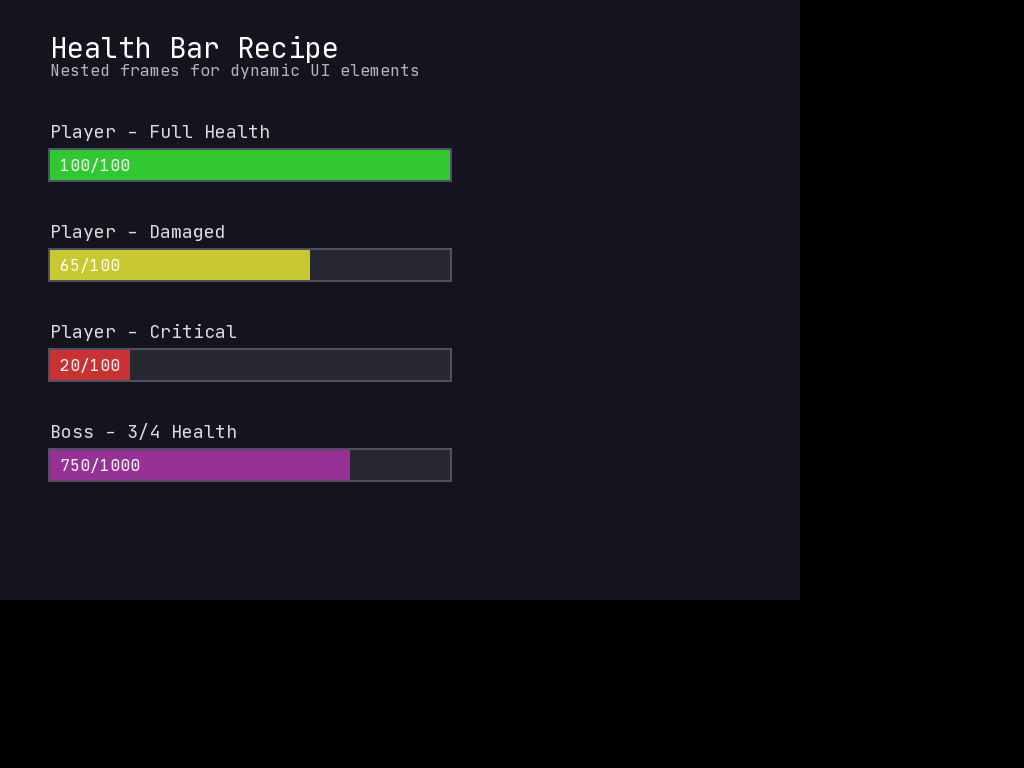
Health bars are a staple of game UI. This recipe shows how to build a flexible health bar using nested Frames - an outer background frame and an inner fill frame that scales with the current value.
The Pattern
A health bar consists of:
- Background Frame - The full-width container showing the maximum extent
- Fill Frame - A child frame whose width represents the current value
- Optional text - A Caption showing numeric values
The key technique is updating fill_frame.w based on the ratio of current to maximum health.
Basic Implementation
import mcrfpy

class HealthBar:
    """A simple health bar with background and fill."""

    def __init__(self, x, y, w, h, current, maximum):
        """
        Create a health bar.

        Args:
            x, y: Position on screen
            w, h: Size of the bar
            current: Current health value
            maximum: Maximum health value
        """
        self.x = x
        self.y = y
        self.w = w
        self.h = h
        self.current = current
        self.maximum = maximum

        # Background (empty bar)
        self.background = mcrfpy.Frame(pos=(x, y), size=(w, h))
        self.background.fill_color = mcrfpy.Color(40, 40, 40)
        self.background.outline = 1
        self.background.outline_color = mcrfpy.Color(80, 80, 80)

        # Fill (current health)
        self.fill = mcrfpy.Frame(pos=(x, y), size=(w, h))
        self.fill.fill_color = mcrfpy.Color(220, 50, 50)
        self.fill.outline = 0

        # Update fill width
        self._update_fill()

    def _update_fill(self):
        """Update the fill frame width based on current/max ratio."""
        ratio = max(0, min(1, self.current / self.maximum))
        self.fill.w = self.w * ratio

    def set_health(self, current, maximum=None):
        """
        Update health values.

        Args:
            current: New current health
            maximum: New maximum health (optional)
        """
        self.current = current
        if maximum is not None:
            self.maximum = maximum
        self._update_fill()

    def add_to_scene(self, ui):
        """Add both frames to scene UI (background first, then fill)."""
        ui.append(self.background)
        ui.append(self.fill)


# Usage Example
scene = mcrfpy.Scene("health_demo")

# Create a health bar
hp_bar = HealthBar(50, 50, 200, 20, current=75, maximum=100)
hp_bar.add_to_scene(scene.children)

# Update health
hp_bar.set_health(50)  # Now at 50%

scene.activate()
Enhanced Health Bar with Text and Colors
A more feature-rich version with numeric display and color transitions:
import mcrfpy

class EnhancedHealthBar:
    """Health bar with text display, color transitions, and animations."""

    def __init__(self, x, y, w, h, current, maximum, show_text=True):
        self.x = x
        self.y = y
        self.w = w
        self.h = h
        self.current = current
        self.maximum = maximum
        self.show_text = show_text

        # Color thresholds (ratio -> color)
        self.colors = {
            0.6: mcrfpy.Color(50, 205, 50),   # Green when > 60%
            0.3: mcrfpy.Color(255, 165, 0),   # Orange when > 30%
            0.0: mcrfpy.Color(220, 20, 20),   # Red when <= 30%
        }

        # Background frame with dark fill
        self.background = mcrfpy.Frame(pos=(x, y), size=(w, h))
        self.background.fill_color = mcrfpy.Color(30, 30, 30)
        self.background.outline = 2
        self.background.outline_color = mcrfpy.Color(100, 100, 100)

        # Fill frame (nested inside background conceptually)
        padding = 2
        self.fill = mcrfpy.Frame(
            pos=(x + padding, y + padding),
            size=(w - padding * 2, h - padding * 2)
        )
        self.fill.outline = 0

        # Text label
        self.label = None
        if show_text:
            self.label = mcrfpy.Caption(
                text="",
                x=x + w / 2 - 20,
                y=y + h / 2 - 8
            )
            self.label.fill_color = mcrfpy.Color(255, 255, 255)
            self.label.outline = 1
            self.label.outline_color = mcrfpy.Color(0, 0, 0)

        self._update()

    def _get_color_for_ratio(self, ratio):
        """Get the appropriate color based on health ratio."""
        for threshold, color in sorted(self.colors.items(), reverse=True):
            if ratio > threshold:
                return color
        # Return the lowest threshold color if ratio is 0 or below
        return self.colors[0.0]

    def _update(self):
        """Update fill width, color, and text."""
        ratio = max(0, min(1, self.current / self.maximum))

        # Update fill width (accounting for padding)
        padding = 2
        self.fill.w = (self.w - padding * 2) * ratio

        # Update color based on ratio
        self.fill.fill_color = self._get_color_for_ratio(ratio)

        # Update text
        if self.label:
            self.label.text = f"{int(self.current)}/{int(self.maximum)}"
            # Center the text
            text_width = len(self.label.text) * 8  # Approximate
            self.label.x = self.x + (self.w - text_width) / 2

    def set_health(self, current, maximum=None):
        """Update health values."""
        self.current = max(0, current)
        if maximum is not None:
            self.maximum = maximum
        self._update()

    def damage(self, amount):
        """Apply damage (convenience method)."""
        self.set_health(self.current - amount)

    def heal(self, amount):
        """Apply healing (convenience method)."""
        self.set_health(min(self.maximum, self.current + amount))

    def add_to_scene(self, ui):
        """Add all components to scene UI."""
        ui.append(self.background)
        ui.append(self.fill)
        if self.label:
            ui.append(self.label)


# Usage
scene = mcrfpy.Scene("demo")

# Create enhanced health bar
hp = EnhancedHealthBar(50, 50, 250, 25, current=100, maximum=100)
hp.add_to_scene(scene.children)

# Simulate damage
hp.damage(30)  # Now 70/100, shows green
hp.damage(25)  # Now 45/100, shows orange
hp.damage(20)  # Now 25/100, shows red

scene.activate()
Animated Health Bar
Add smooth transitions when health changes:
import mcrfpy

class AnimatedHealthBar:
    """Health bar with smooth fill animation."""

    def __init__(self, x, y, w, h, current, maximum):
        self.x = x
        self.y = y
        self.w = w
        self.h = h
        self.current = current
        self.display_current = current  # What's visually shown
        self.maximum = maximum
        self.timer_name = f"hp_anim_{id(self)}"

        # Background
        self.background = mcrfpy.Frame(pos=(x, y), size=(w, h))
        self.background.fill_color = mcrfpy.Color(40, 40, 40)
        self.background.outline = 2
        self.background.outline_color = mcrfpy.Color(60, 60, 60)

        # Damage preview (shows recent damage in different color)
        self.damage_fill = mcrfpy.Frame(pos=(x + 2, y + 2), size=(w - 4, h - 4))
        self.damage_fill.fill_color = mcrfpy.Color(180, 50, 50)
        self.damage_fill.outline = 0

        # Main fill
        self.fill = mcrfpy.Frame(pos=(x + 2, y + 2), size=(w - 4, h - 4))
        self.fill.fill_color = mcrfpy.Color(50, 200, 50)
        self.fill.outline = 0

        self._update_display()

    def _update_display(self):
        """Update the visual fill based on display_current."""
        ratio = max(0, min(1, self.display_current / self.maximum))
        self.fill.w = (self.w - 4) * ratio

        # Color based on ratio
        if ratio > 0.6:
            self.fill.fill_color = mcrfpy.Color(50, 200, 50)
        elif ratio > 0.3:
            self.fill.fill_color = mcrfpy.Color(230, 180, 30)
        else:
            self.fill.fill_color = mcrfpy.Color(200, 50, 50)

    def set_health(self, new_current, animate=True):
        """
        Set health with optional animation.

        Args:
            new_current: New health value
            animate: Whether to animate the transition
        """
        old_current = self.current
        self.current = max(0, min(self.maximum, new_current))

        if not animate:
            self.display_current = self.current
            self._update_display()
            return

        # Show damage preview immediately
        if self.current < old_current:
            damage_ratio = self.current / self.maximum
            self.damage_fill.w = (self.w - 4) * (old_current / self.maximum)

        # Animate the fill
        self._start_animation()

    def _start_animation(self):
        """Start animating toward target health."""
        self._animating = True

        def animate_step(timer, runtime):
            if not self._animating:
                return
            # Lerp toward target
            diff = self.current - self.display_current
            if abs(diff) < 0.5:
                self.display_current = self.current
                self._animating = False
                # Also update damage preview
                self.damage_fill.w = self.fill.w
            else:
                # Move 10% of the way each frame
                self.display_current += diff * 0.1
                # Continue animation
                mcrfpy.Timer(self.timer_name, animate_step, 16)

            self._update_display()

        mcrfpy.Timer(self.timer_name, animate_step, 16)

    def damage(self, amount):
        """Apply damage with animation."""
        self.set_health(self.current - amount, animate=True)

    def heal(self, amount):
        """Apply healing with animation."""
        self.set_health(self.current + amount, animate=True)

    def add_to_scene(self, ui):
        """Add all frames to scene."""
        ui.append(self.background)
        ui.append(self.damage_fill)
        ui.append(self.fill)


# Usage
hp_bar = AnimatedHealthBar(50, 50, 300, 30, current=100, maximum=100)
hp_bar.add_to_scene(scene.children)

# Damage will animate smoothly
hp_bar.damage(40)
Multiple Resource Bars
For games with multiple stats (HP, MP, Stamina, etc.):
import mcrfpy

class ResourceBar:
    """Generic resource bar that can represent any stat."""

    def __init__(self, x, y, w, h, current, maximum,
                 fill_color, bg_color=None, label=""):
        self.x = x
        self.y = y
        self.w = w
        self.h = h
        self.current = current
        self.maximum = maximum
        self.label_text = label

        if bg_color is None:
            bg_color = mcrfpy.Color(30, 30, 30)

        # Background
        self.background = mcrfpy.Frame(pos=(x, y), size=(w, h))
        self.background.fill_color = bg_color
        self.background.outline = 1
        self.background.outline_color = mcrfpy.Color(60, 60, 60)

        # Fill
        self.fill = mcrfpy.Frame(pos=(x + 1, y + 1), size=(w - 2, h - 2))
        self.fill.fill_color = fill_color
        self.fill.outline = 0

        # Label (left side)
        self.label = mcrfpy.Caption(text=label, x=x - 30, y=y + 2)
        self.label.fill_color = mcrfpy.Color(200, 200, 200)

        self._update()

    def _update(self):
        ratio = max(0, min(1, self.current / self.maximum))
        self.fill.w = (self.w - 2) * ratio

    def set_value(self, current, maximum=None):
        self.current = max(0, current)
        if maximum:
            self.maximum = maximum
        self._update()

    def add_to_scene(self, ui):
        if self.label_text:
            ui.append(self.label)
        ui.append(self.background)
        ui.append(self.fill)


class PlayerStats:
    """Collection of resource bars for a player."""

    def __init__(self, x, y):
        bar_width = 200
        bar_height = 18
        spacing = 25

        self.hp = ResourceBar(
            x, y, bar_width, bar_height,
            current=100, maximum=100,
            fill_color=mcrfpy.Color(220, 50, 50),
            label="HP"
        )

        self.mp = ResourceBar(
            x, y + spacing, bar_width, bar_height,
            current=50, maximum=50,
            fill_color=mcrfpy.Color(50, 100, 220),
            label="MP"
        )

        self.stamina = ResourceBar(
            x, y + spacing * 2, bar_width, bar_height,
            current=80, maximum=80,
            fill_color=mcrfpy.Color(50, 180, 50),
            label="SP"
        )

    def add_to_scene(self, ui):
        self.hp.add_to_scene(ui)
        self.mp.add_to_scene(ui)
        self.stamina.add_to_scene(ui)


# Usage
scene = mcrfpy.Scene("stats_demo")

stats = PlayerStats(80, 20)
stats.add_to_scene(scene.children)

# Update individual stats
stats.hp.set_value(75)
stats.mp.set_value(30)
stats.stamina.set_value(60)

scene.activate()
McRogueFace-Specific Considerations
-
Frame Layering: Frames are rendered in the order they’re added to the UICollection. Add background first, then fill, then text to ensure proper layering.
-
No Built-in Clipping: The fill frame can extend beyond the background if you set
fill.wtoo large. Always clamp the ratio between 0 and 1. -
Absolute Positioning: Remember that nested conceptual elements still use absolute screen coordinates. Calculate child positions as
parent.x + offset. -
Timer Management: When using animations, use unique timer names (like
f"hp_anim_{id(self)}") to avoid conflicts between multiple health bars. -
Performance: For many entities with health bars (like enemies), consider only updating visible health bars or using a pooling system.
-
Alignment: Rather than hand-positioning bars, consider using UI Alignment with
align=Alignment.TOP_LEFTand amarginto anchor health bars relative to their parent.
Complete Example
import mcrfpy
import random

scene = mcrfpy.Scene("game")

# Player health bar at top
player_hp = EnhancedHealthBar(10, 10, 300, 30, 100, 100)
player_hp.add_to_scene(scene.children)

# Enemy health bar
enemy_hp = EnhancedHealthBar(400, 10, 200, 20, 50, 50)
enemy_hp.add_to_scene(scene.children)

# Simulate combat
def combat_tick(timer, runtime):
    if random.random() < 0.3:
        player_hp.damage(random.randint(5, 15))
    if random.random() < 0.4:
        enemy_hp.damage(random.randint(3, 8))

combat_timer = mcrfpy.Timer("combat", combat_tick, 1000)

# Keyboard controls for testing
def on_key(key, state):
    if state != mcrfpy.InputState.PRESSED:
        return
    if key == mcrfpy.Key.H:
        player_hp.heal(20)
    elif key == mcrfpy.Key.D:
        player_hp.damage(10)

scene.on_key = on_key
scene.activate()