Cellular Automata Caves
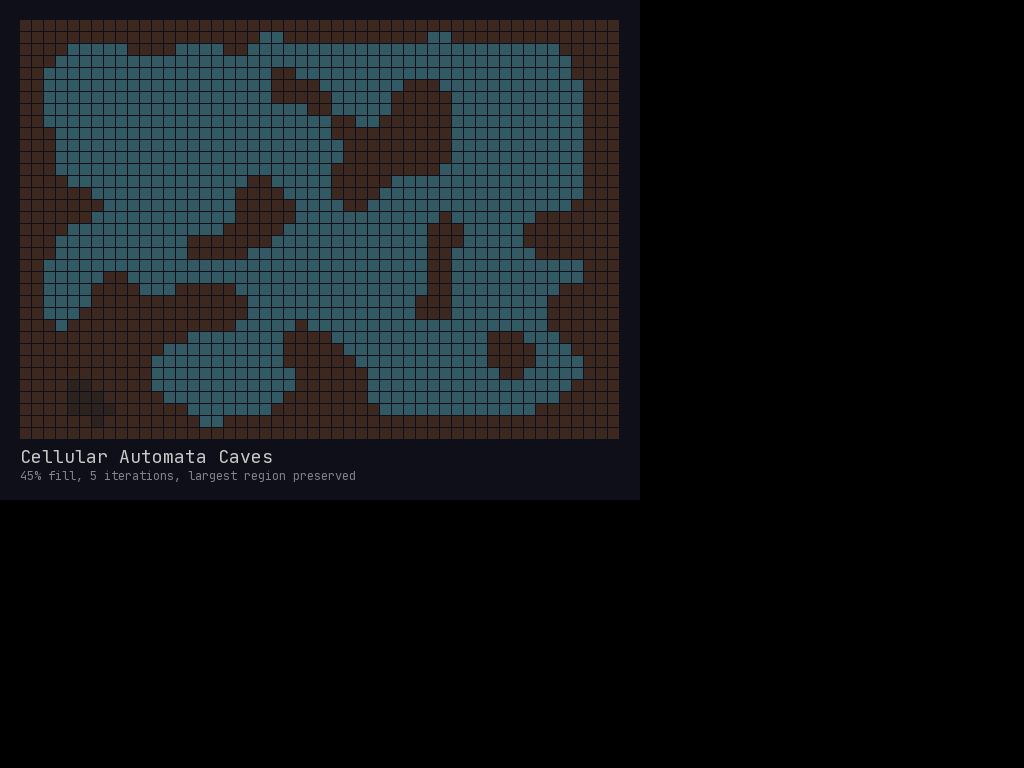
Generate organic, natural-looking cave systems using cellular automata smoothing.
Overview
Cellular automata cave generation creates organic shapes by:
- Starting with random noise
- Repeatedly applying smoothing rules
- Resulting in natural-looking cave formations
Unlike BSP dungeons (rectangular rooms + corridors), cellular caves produce flowing, organic spaces perfect for natural caverns, underground lakes, or alien hives.
Note:
cell.tilesprite(used throughout this recipe) is legacy. For new code, prefer drawing visuals through aTileLayer(e.g.layer.set((x, y), 1)) instead;cell.walkableassignments are unaffected and stay as-is.
Quick Start
import mcrfpy
import random

def generate_caves(grid, fill_chance=0.45, iterations=5):
    """Generate organic caves using cellular automata."""
    width, height = int(grid.grid_size[0]), int(grid.grid_size[1])

    # Step 1: Random noise
    for y in range(height):
        for x in range(width):
            cell = grid.at((x, y))
            # Border is always wall
            if x == 0 or x == width-1 or y == 0 or y == height-1:
                cell.walkable = False
                cell.tilesprite = 1  # Wall
            else:
                is_wall = random.random() < fill_chance
                cell.walkable = not is_wall
                cell.tilesprite = 1 if is_wall else 0

    # Step 2: Smooth with cellular automata rules
    for _ in range(iterations):
        smooth_caves(grid)

    return grid

def smooth_caves(grid):
    """Apply one iteration of cellular automata smoothing."""
    width, height = int(grid.grid_size[0]), int(grid.grid_size[1])

    # Create a copy of current state
    walls = [[not grid.at((x, y)).walkable
              for x in range(width)]
             for y in range(height)]

    for y in range(1, height - 1):
        for x in range(1, width - 1):
            # Count wall neighbors (including diagonals)
            wall_count = 0
            for dy in [-1, 0, 1]:
                for dx in [-1, 0, 1]:
                    if dx == 0 and dy == 0:
                        continue
                    if walls[y + dy][x + dx]:
                        wall_count += 1

            cell = grid.at((x, y))
            # Rule: >=5 walls = become wall, <=3 walls = become floor
            if wall_count >= 5:
                cell.walkable = False
                cell.tilesprite = 1
            elif wall_count <= 3:
                cell.walkable = True
                cell.tilesprite = 0
The Algorithm Explained
Initial Noise
Start by randomly filling ~45% of cells as walls:
. # . . # # . # . .
# # . # . . # . # #
. . # # # . . . # .
# . . . # # # . . #
. # # . . . . # . .
Smoothing Rules
For each cell, count its 8 neighbors:
- 5+ wall neighbors → Cell becomes wall (consolidation)
- 3 or fewer wall neighbors → Cell becomes floor (erosion)
- 4 neighbors → Cell stays the same (stability)
After Iterations
. . . . # # # # . .
. . . # # . . # # #
. . # # # . . . # #
# . . . # # # . . #
# # # . . . . . . .
Each iteration smooths the noise into larger connected regions.
Finding the Largest Cave
After generation, use flood-fill to find and keep only the largest connected region:
def find_largest_cave(grid):
    """Find the largest connected walkable region."""
    width, height = int(grid.grid_size[0]), int(grid.grid_size[1])
    visited = set()
    regions = []

    def flood_fill(start_x, start_y):
        """Flood fill from a point, return all connected cells."""
        cells = []
        stack = [(start_x, start_y)]

        while stack:
            x, y = stack.pop()
            if (x, y) in visited:
                continue
            if x < 0 or x >= width or y < 0 or y >= height:
                continue
            if not grid.at((x, y)).walkable:
                continue

            visited.add((x, y))
            cells.append((x, y))

            stack.extend([(x+1, y), (x-1, y), (x, y+1), (x, y-1)])

        return cells

    # Find all regions
    for y in range(height):
        for x in range(width):
            if (x, y) not in visited and grid.at((x, y)).walkable:
                region = flood_fill(x, y)
                if region:
                    regions.append(region)

    # Keep only the largest
    if not regions:
        return []

    largest = max(regions, key=len)

    # Fill in smaller regions as walls
    for region in regions:
        if region is not largest:
            for x, y in region:
                cell = grid.at((x, y))
                cell.walkable = False
                cell.tilesprite = 1

    return largest
Connecting Disconnected Caves
Alternatively, connect separate cave regions with tunnels:
def connect_caves(grid, regions):
    """Connect separate cave regions with tunnels."""
    if len(regions) < 2:
        return

    # Sort by size, connect smaller to larger
    regions = sorted(regions, key=len, reverse=True)
    main_region = set(regions[0])

    for region in regions[1:]:
        # Find closest points between regions
        best_dist = float('inf')
        best_pair = None

        for x1, y1 in region:
            for x2, y2 in main_region:
                dist = abs(x2 - x1) + abs(y2 - y1)  # Manhattan distance
                if dist < best_dist:
                    best_dist = dist
                    best_pair = ((x1, y1), (x2, y2))

        # Dig tunnel
        if best_pair:
            dig_tunnel(grid, best_pair[0], best_pair[1])
            main_region.update(region)

def dig_tunnel(grid, start, end):
    """Dig a tunnel between two points."""
    x1, y1 = start
    x2, y2 = end

    # Horizontal then vertical
    x = x1
    while x != x2:
        cell = grid.at((x, y1))
        cell.walkable = True
        cell.tilesprite = 0
        x += 1 if x2 > x1 else -1

    y = y1
    while y != y2:
        cell = grid.at((x2, y))
        cell.walkable = True
        cell.tilesprite = 0
        y += 1 if y2 > y1 else -1
Variation: Different Fill Ratios
The initial fill ratio dramatically changes cave character:
| Fill % | Result |
|---|---|
| 35-40% | Large open caverns with pillars |
| 45-50% | Classic caves with good connectivity |
| 55-60% | Tight tunnels and small chambers |
| 65%+ | Mostly walls with isolated pockets |
# Open caverns
generate_caves(grid, fill_chance=0.38, iterations=4)

# Classic caves
generate_caves(grid, fill_chance=0.45, iterations=5)

# Tight tunnels
generate_caves(grid, fill_chance=0.55, iterations=6)
Variation: Different Rules
Customize the automata rules for different effects:
def smooth_caves_custom(grid, birth_limit=5, death_limit=4):
    """Customizable cellular automata rules.

    Args:
        birth_limit: Wall count >= this turns floor into wall
        death_limit: Wall count < this turns wall into floor
    """
    width, height = int(grid.grid_size[0]), int(grid.grid_size[1])
    walls = [[not grid.at((x, y)).walkable
              for x in range(width)]
             for y in range(height)]

    for y in range(1, height - 1):
        for x in range(1, width - 1):
            wall_count = sum(
                walls[y + dy][x + dx]
                for dy in [-1, 0, 1]
                for dx in [-1, 0, 1]
                if not (dx == 0 and dy == 0)
            )

            cell = grid.at((x, y))
            is_wall = walls[y][x]

            if is_wall:
                # Wall survives if enough neighbors
                if wall_count < death_limit:
                    cell.walkable = True
                    cell.tilesprite = 0
            else:
                # Floor becomes wall if too many neighbors
                if wall_count >= birth_limit:
                    cell.walkable = False
                    cell.tilesprite = 1
Finding Cave Features
Walk the grid directly to identify interesting cave features (dead ends, wide rooms, chokepoints). For distance-based variants — e.g. “how far is this cell from the entrance” — feed the map into a DijkstraMap via grid.get_dijkstra_map(source) and call .distance((x, y)) or .to_heightmap() instead of the manual neighbor count below:
def find_cave_features(grid, spawn_point):
    """Find dead ends, wide areas, and chokepoints."""
    width, height = int(grid.grid_size[0]), int(grid.grid_size[1])

    dead_ends = []      # Cells with only one walkable neighbor
    wide_areas = []     # Cells with 6+ walkable neighbors
    chokepoints = []    # Cells where path width is narrow

    for y in range(1, height - 1):
        for x in range(1, width - 1):
            if not grid.at((x, y)).walkable:
                continue

            # Count walkable neighbors
            walkable_neighbors = sum(
                1 for dy in [-1, 0, 1]
                for dx in [-1, 0, 1]
                if not (dx == 0 and dy == 0)
                and grid.at((x + dx, y + dy)).walkable
            )

            if walkable_neighbors <= 1:
                dead_ends.append((x, y))
            elif walkable_neighbors >= 6:
                wide_areas.append((x, y))
            elif walkable_neighbors == 2:
                chokepoints.append((x, y))

    return {
        'dead_ends': dead_ends,      # Good for treasure, secrets
        'wide_areas': wide_areas,    # Good for boss arenas
        'chokepoints': chokepoints   # Good for traps, doors
    }
Complete Example
import mcrfpy
import random

# Setup
scene = mcrfpy.Scene("caves")
scene.activate()

# Create grid
texture = mcrfpy.default_texture
grid = mcrfpy.Grid(grid_size=(60, 40), texture=texture,
                   pos=(0, 0), size=(960, 640))
scene.children.append(grid)

# Generate caves
generate_caves(grid, fill_chance=0.45, iterations=5)

# Find largest connected region
largest = find_largest_cave(grid)
print(f"Largest cave has {len(largest)} cells")

# Find features
spawn = largest[0]  # Start at first cell of largest region
features = find_cave_features(grid, spawn)
print(f"Found {len(features['dead_ends'])} dead ends")
print(f"Found {len(features['wide_areas'])} wide areas")

# Place player at spawn
player = mcrfpy.Entity(spawn, texture, sprite_index=64)
grid.entities.append(player)

# Place treasure at dead ends
for i, pos in enumerate(features['dead_ends'][:5]):
    treasure = mcrfpy.Entity(pos, texture, sprite_index=32)
    grid.entities.append(treasure)

# Place boss in widest area (if any)
if features['wide_areas']:
    boss_pos = features['wide_areas'][0]
    boss = mcrfpy.Entity(boss_pos, texture, sprite_index=80)
    grid.entities.append(boss)

grid.center_camera(spawn)
Tips
- Iteration count: 4-6 iterations usually optimal; more = smoother but slower
- Border walls: Always keep edges as walls to prevent open boundaries
- Connectivity: Always check/ensure connectivity after generation
- Seed control: Use
random.seed(n)for reproducible caves - Post-processing: Add water pools, mushroom patches, etc. in wide areas
Related Recipes
- Dungeon Generator - BSP room-based generation
- Dijkstra to HeightMap - Distance-based features
- Fog of War - Visibility in caves