Message Log Widget
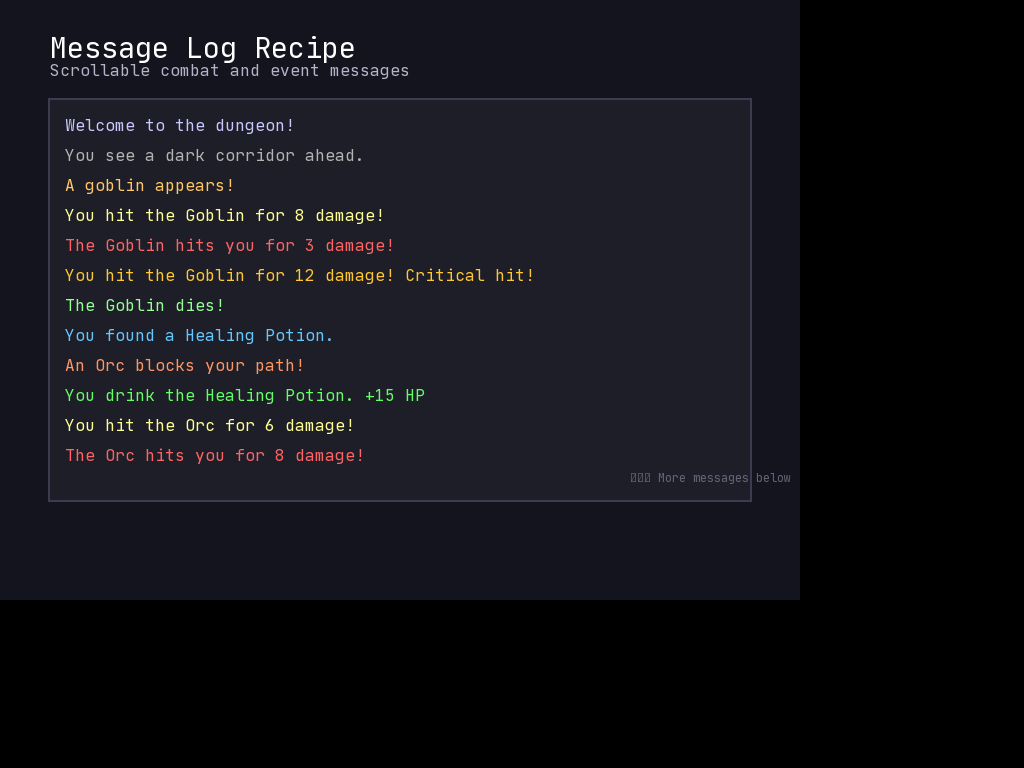
A scrolling message log is essential for RPGs, roguelikes, and any game that needs to display event history. This recipe shows how to build a reusable message log using Frame and Caption elements.
The Pattern
A message log consists of:
- A container Frame that clips content to its bounds
- Caption elements for each message line
- A message buffer that tracks history and handles overflow
- Auto-scroll behavior to show the newest messages
The key insight is that Frame.children is a UICollection, so we can dynamically add and remove Caption elements as messages flow through.
Basic Implementation
import mcrfpy

class MessageLog:
    """A scrolling message log widget for displaying game events."""

    def __init__(self, x, y, w, h, max_messages=100, line_height=18):
        """
        Create a new message log.

        Args:
            x, y: Position of the log on screen
            w, h: Size of the log area
            max_messages: Maximum messages to keep in history
            line_height: Pixel height of each message line
        """
        self.max_messages = max_messages
        self.line_height = line_height
        self.messages = []  # Store message data

        # Create the container frame
        self.frame = mcrfpy.Frame(pos=(x, y), size=(w, h))
        self.frame.fill_color = mcrfpy.Color(20, 20, 30, 220)
        self.frame.outline = 1
        self.frame.outline_color = mcrfpy.Color(60, 60, 80)

        # Calculate visible lines
        self.visible_lines = int(h / line_height)
        self.scroll_offset = 0

    def add(self, text, color=None):
        """
        Add a message to the log.

        Args:
            text: The message text
            color: Optional Color for the text (defaults to white)
        """
        if color is None:
            color = mcrfpy.Color(220, 220, 220)

        # Add to message buffer
        self.messages.append({'text': text, 'color': color})

        # Trim old messages if over limit
        if len(self.messages) > self.max_messages:
            self.messages = self.messages[-self.max_messages:]

        # Auto-scroll to bottom
        self.scroll_offset = max(0, len(self.messages) - self.visible_lines)

        # Rebuild the display
        self._rebuild_display()

    def _rebuild_display(self):
        """Rebuild all visible Caption elements."""
        # Clear existing children
        self.frame.children.clear()

        # Calculate which messages to show
        start_idx = self.scroll_offset
        end_idx = min(start_idx + self.visible_lines, len(self.messages))

        # Create Caption for each visible message
        # (Frame.children are positioned in frame-local coordinates,
        # not absolute screen coordinates)
        for i, msg_idx in enumerate(range(start_idx, end_idx)):
            msg = self.messages[msg_idx]
            caption = mcrfpy.Caption(
                text=msg['text'],
                pos=(5, 5 + (i * self.line_height))
            )
            caption.fill_color = msg['color']
            self.frame.children.append(caption)

    def scroll_up(self, lines=1):
        """Scroll the log up (show older messages)."""
        self.scroll_offset = max(0, self.scroll_offset - lines)
        self._rebuild_display()

    def scroll_down(self, lines=1):
        """Scroll the log down (show newer messages)."""
        max_offset = max(0, len(self.messages) - self.visible_lines)
        self.scroll_offset = min(max_offset, self.scroll_offset + lines)
        self._rebuild_display()

    def clear(self):
        """Clear all messages from the log."""
        self.messages = []
        self.scroll_offset = 0
        self._rebuild_display()


# Usage Example
scene = mcrfpy.Scene("log_demo")

# Create the message log
log = MessageLog(50, 400, 400, 200)
scene.children.append(log.frame)

scene.activate()

# Add some test messages
log.add("Welcome to the dungeon!")
log.add("You see a dark corridor ahead.", mcrfpy.Color(150, 150, 150))
log.add("A goblin appears!", mcrfpy.Color(255, 100, 100))
log.add("You attack the goblin for 5 damage.", mcrfpy.Color(255, 200, 100))
log.add("The goblin strikes back!", mcrfpy.Color(255, 100, 100))
Enhanced Version with Timestamps and Categories
For more complex games, you may want message categories, timestamps, or filtering:
import mcrfpy
import time

class EnhancedMessageLog:
    """Message log with categories, timestamps, and filtering."""

    # Predefined message categories with colors
    CATEGORIES = {
        'system': mcrfpy.Color(150, 150, 255),
        'combat': mcrfpy.Color(255, 100, 100),
        'loot': mcrfpy.Color(255, 215, 0),
        'dialog': mcrfpy.Color(100, 255, 100),
        'info': mcrfpy.Color(200, 200, 200),
    }

    def __init__(self, x, y, w, h, max_messages=200, line_height=18):
        self.max_messages = max_messages
        self.line_height = line_height
        self.messages = []
        self.filter_category = None  # None = show all

        self.frame = mcrfpy.Frame(pos=(x, y), size=(w, h))
        self.frame.fill_color = mcrfpy.Color(15, 15, 25, 240)
        self.frame.outline = 2
        self.frame.outline_color = mcrfpy.Color(80, 80, 120)

        self.visible_lines = int(h / line_height)
        self.scroll_offset = 0

    def add(self, text, category='info', show_time=False):
        """
        Add a categorized message.

        Args:
            text: Message text
            category: Category key (system, combat, loot, dialog, info)
            show_time: Whether to prepend timestamp
        """
        color = self.CATEGORIES.get(category, self.CATEGORIES['info'])

        if show_time:
            # Game time or real time - customize as needed
            timestamp = time.strftime("%H:%M")
            text = f"[{timestamp}] {text}"

        self.messages.append({
            'text': text,
            'color': color,
            'category': category,
            'timestamp': time.time()
        })

        if len(self.messages) > self.max_messages:
            self.messages = self.messages[-self.max_messages:]

        # Auto-scroll only if already at bottom
        visible_msgs = self._get_filtered_messages()
        if self.scroll_offset >= len(visible_msgs) - self.visible_lines - 1:
            self.scroll_offset = max(0, len(visible_msgs) - self.visible_lines)

        self._rebuild_display()

    def _get_filtered_messages(self):
        """Get messages matching current filter."""
        if self.filter_category is None:
            return self.messages
        return [m for m in self.messages if m['category'] == self.filter_category]

    def set_filter(self, category):
        """
        Set category filter.

        Args:
            category: Category to show, or None for all
        """
        self.filter_category = category
        self.scroll_offset = 0
        self._rebuild_display()

    def _rebuild_display(self):
        """Rebuild visible messages."""
        self.frame.children.clear()

        filtered = self._get_filtered_messages()
        start_idx = self.scroll_offset
        end_idx = min(start_idx + self.visible_lines, len(filtered))

        # Positions are frame-local (relative to the frame's top-left corner)
        for i, msg_idx in enumerate(range(start_idx, end_idx)):
            msg = filtered[msg_idx]
            caption = mcrfpy.Caption(
                text=msg['text'],
                pos=(8, 4 + (i * self.line_height))
            )
            caption.fill_color = msg['color']
            self.frame.children.append(caption)

    def scroll_up(self, lines=1):
        self.scroll_offset = max(0, self.scroll_offset - lines)
        self._rebuild_display()

    def scroll_down(self, lines=1):
        filtered = self._get_filtered_messages()
        max_offset = max(0, len(filtered) - self.visible_lines)
        self.scroll_offset = min(max_offset, self.scroll_offset + lines)
        self._rebuild_display()

    # Convenience methods for common message types
    def system(self, text):
        self.add(text, 'system')

    def combat(self, text):
        self.add(text, 'combat')

    def loot(self, text):
        self.add(text, 'loot')

    def dialog(self, text):
        self.add(text, 'dialog')


# Usage
scene = mcrfpy.Scene("enhanced_log_demo")
log = EnhancedMessageLog(50, 400, 500, 250)
scene.children.append(log.frame)
scene.activate()

log.system("Game loaded successfully.")
log.combat("You attack the skeleton!")
log.combat("The skeleton crumbles to dust.")
log.loot("You found 50 gold!")
log.dialog("The merchant says: 'Welcome, traveler!'")

# Filter to only combat messages
log.set_filter('combat')

# Show all again
log.set_filter(None)
Hooking Up Scroll Controls
Connect keyboard or mouse input to scroll the log:
def handle_keys(key, state):
    if state != mcrfpy.InputState.PRESSED:
        return

    if key == mcrfpy.Key.PAGE_UP:
        log.scroll_up(5)
    elif key == mcrfpy.Key.PAGE_DOWN:
        log.scroll_down(5)

scene.on_key = handle_keys

# Or with mouse scroll on the frame
def on_log_scroll(pos, button, action):
    # Note: You may need to implement scroll detection
    # based on your input system
    pass

log.frame.on_click = on_log_scroll
McRogueFace-Specific Considerations
-
Child Positioning: Caption positions in Frame.children are frame-local (relative to the frame’s top-left corner), not absolute screen coordinates. A Frame has no camera, so it can’t pan its content – frame-local positions are effectively screen space already. Just use
pos=(offset_x, offset_y), no need to addframe.x/frame.y. -
Clipping: Frame supports
clip_children=True, which clips children to the frame’s bounds. Enable it on the log frame (self.frame.clip_children = True) so overflowing messages don’t render outside the log area. - Performance: Rebuilding all captions on every message can be expensive with many visible lines. For high-frequency logging, consider:
- Only updating when scrolled or at intervals
- Reusing Caption objects instead of recreating them
- Batching multiple messages before rebuilding
- Font Metrics: The default font has approximately 8 pixels per character width. Adjust
line_heightbased on your font size for proper spacing.
Complete Example
See the full working example that demonstrates all features:
import mcrfpy

# Initialize
scene = mcrfpy.Scene("game")

# Create log at bottom of screen
log = EnhancedMessageLog(10, 500, 700, 250, line_height=20)
scene.children.append(log.frame)

# Simulate game events
def simulate_combat(timer, runtime):
    import random
    events = [
        ("You swing your sword!", "combat"),
        ("The orc dodges!", "combat"),
        ("Critical hit!", "combat"),
        ("You found a potion!", "loot"),
    ]
    event = random.choice(events)
    log.add(event[0], event[1])

# Add messages every 2 seconds for demo
mcrfpy.Timer("combat_sim", simulate_combat, 2000)

# Keyboard controls
def on_key(key, state):
    if state != mcrfpy.InputState.PRESSED:
        return
    if key == mcrfpy.Key.PAGE_UP:
        log.scroll_up(3)
    elif key == mcrfpy.Key.PAGE_DOWN:
        log.scroll_down(3)
    elif key == mcrfpy.Key.C:
        log.set_filter('combat')
    elif key == mcrfpy.Key.L:
        log.set_filter('loot')
    elif key == mcrfpy.Key.A:
        log.set_filter(None)  # All

scene.on_key = on_key

log.system("Press PageUp/PageDown to scroll")
log.system("Press C for combat, L for loot, A for all")

scene.activate()