Floating Damage Numbers
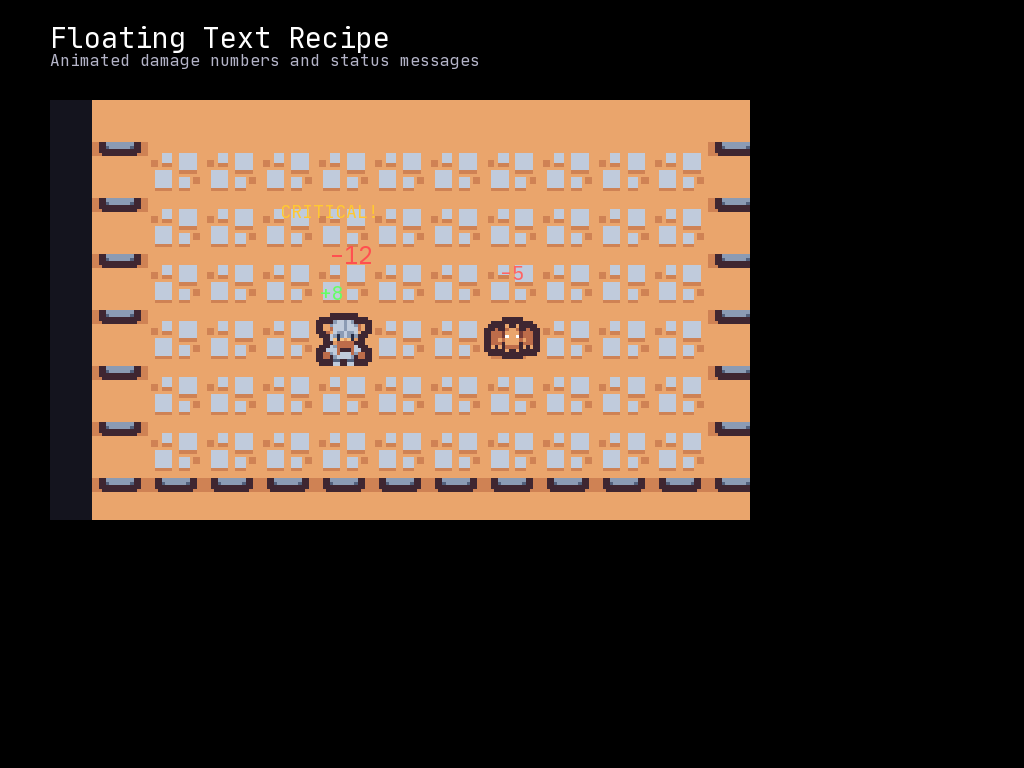
Text that floats upward and fades out, commonly used for damage numbers, healing, XP gains, and other combat feedback.
Quick Example
import mcrfpy

def show_damage(scene, x, y, amount, color=(255, 50, 50)):
    """Display floating damage number that rises and fades."""
    # Create the caption
    caption = mcrfpy.Caption(text=str(amount), x=x, y=y)
    caption.fill_color = mcrfpy.Color(color[0], color[1], color[2], 255)
    caption.font_size = 24
    scene.children.append(caption)

    # Animate upward movement
    caption.animate("y", float(y - 50), 0.8, mcrfpy.Easing.EASE_OUT)

    # Animate fade out
    caption.animate("opacity", 0.0, 0.8, mcrfpy.Easing.EASE_IN)

    # Remove caption after animation completes
    def cleanup(timer, runtime):
        try:
            scene.children.remove(caption)
        except ValueError:
            pass

    mcrfpy.Timer("cleanup_damage", cleanup, 850, once=True)

# Usage
game_scene = mcrfpy.Scene("game")
mcrfpy.current_scene = game_scene
show_damage(game_scene, 400, 300, 42)
Grid-Aware Floating Text
Convert grid coordinates to screen coordinates:
import mcrfpy

def grid_to_screen(grid, grid_x, grid_y):
    """Convert grid tile coordinates to screen pixel coordinates."""
    # Account for grid position, zoom, and center offset
    tile_size = 16 * grid.zoom
    center_offset_x = grid.center[0] * grid.zoom
    center_offset_y = grid.center[1] * grid.zoom
    grid_center_x = grid.x + (grid.w / 2)
    grid_center_y = grid.y + (grid.h / 2)

    screen_x = grid_center_x + (grid_x * tile_size) - center_offset_x + (tile_size / 2)
    screen_y = grid_center_y + (grid_y * tile_size) - center_offset_y

    return screen_x, screen_y

def show_grid_damage(scene, grid, grid_x, grid_y, amount, color=(255, 50, 50)):
    """Show floating damage at a grid position."""
    screen_x, screen_y = grid_to_screen(grid, grid_x, grid_y)
    show_damage(scene, screen_x, screen_y, amount, color)

# Usage
show_grid_damage(game_scene, grid, int(enemy.x), int(enemy.y), 25)
FloatingTextManager Class
A complete system for managing multiple floating text elements:
import mcrfpy
import random

class FloatingTextManager:
    """Manages floating text effects with automatic cleanup."""

    # Preset colors
    DAMAGE = (255, 50, 50)      # Red
    CRITICAL = (255, 200, 0)    # Gold
    HEAL = (50, 255, 50)        # Green
    MANA = (50, 150, 255)       # Blue
    XP = (200, 150, 255)        # Purple
    MISS = (150, 150, 150)      # Gray
    BLOCK = (100, 100, 100)     # Dark gray

    def __init__(self, scene, grid=None):
        """
        Args:
            scene: mcrfpy.Scene object to add floating text to
            grid: Optional grid for coordinate conversion
        """
        self.scene = scene
        self.grid = grid
        self.active_texts = []
        self.text_id = 0

    def _grid_to_screen(self, grid_x, grid_y):
        """Convert grid to screen coordinates."""
        if not self.grid:
            return grid_x, grid_y

        tile_size = 16 * self.grid.zoom
        center_offset_x = self.grid.center[0] * self.grid.zoom
        center_offset_y = self.grid.center[1] * self.grid.zoom
        grid_center_x = self.grid.x + (self.grid.w / 2)
        grid_center_y = self.grid.y + (self.grid.h / 2)

        screen_x = grid_center_x + (grid_x * tile_size) - center_offset_x + (tile_size / 2)
        screen_y = grid_center_y + (grid_y * tile_size) - center_offset_y

        return screen_x, screen_y

    def spawn(self, x, y, text, color, duration=0.8, font_size=24,
              rise=50, spread=0, is_grid_pos=False):
        """
        Spawn floating text at a position.

        Args:
            x, y: Position (grid or screen based on is_grid_pos)
            text: Text to display
            color: RGB tuple
            duration: Animation duration in seconds
            font_size: Text size
            rise: How many pixels to float upward
            spread: Random horizontal spread (0 = straight up)
            is_grid_pos: If True, convert from grid coordinates
        """
        if is_grid_pos:
            x, y = self._grid_to_screen(x, y)

        # Add random spread for visual variety
        if spread > 0:
            x += random.randint(-spread, spread)

        # Create caption
        caption = mcrfpy.Caption(text=str(text), x=x, y=y)
        caption.fill_color = mcrfpy.Color(color[0], color[1], color[2], 255)
        caption.font_size = font_size
        self.scene.children.append(caption)

        # Store reference
        self.text_id += 1
        text_info = {"id": self.text_id, "caption": caption}
        self.active_texts.append(text_info)

        # Animate upward
        caption.animate("y", float(y - rise), duration, mcrfpy.Easing.EASE_OUT)

        # Animate fade
        caption.animate("opacity", 0.0, duration, mcrfpy.Easing.EASE_IN)

        # Schedule cleanup
        cleanup_id = self.text_id
        def cleanup(timer, runtime, tid=cleanup_id):
            self._remove_text(tid)

        mcrfpy.Timer(f"float_cleanup_{self.text_id}", cleanup,
                     int(duration * 1000) + 50, once=True)

    def _remove_text(self, text_id):
        """Remove a text element by ID."""
        for i, info in enumerate(self.active_texts):
            if info["id"] == text_id:
                caption = info["caption"]
                # Find in scene and remove
                try:
                    self.scene.children.remove(caption)
                except ValueError:
                    pass
                self.active_texts.pop(i)
                break

    # Convenience methods
    def damage(self, x, y, amount, is_grid=True):
        """Show damage number."""
        self.spawn(x, y, f"-{amount}", self.DAMAGE,
                   font_size=24, spread=10, is_grid_pos=is_grid)

    def critical(self, x, y, amount, is_grid=True):
        """Show critical hit (larger, gold)."""
        self.spawn(x, y, f"-{amount}!", self.CRITICAL,
                   font_size=32, rise=60, spread=5, is_grid_pos=is_grid)

    def heal(self, x, y, amount, is_grid=True):
        """Show healing number."""
        self.spawn(x, y, f"+{amount}", self.HEAL,
                   font_size=24, spread=10, is_grid_pos=is_grid)

    def xp(self, x, y, amount, is_grid=True):
        """Show XP gain."""
        self.spawn(x, y, f"+{amount} XP", self.XP,
                   font_size=20, duration=1.2, is_grid_pos=is_grid)

    def miss(self, x, y, is_grid=True):
        """Show miss indicator."""
        self.spawn(x, y, "MISS", self.MISS,
                   font_size=18, spread=15, is_grid_pos=is_grid)

    def block(self, x, y, is_grid=True):
        """Show block indicator."""
        self.spawn(x, y, "BLOCK", self.BLOCK,
                   font_size=20, is_grid_pos=is_grid)

    def custom(self, x, y, text, color, is_grid=True, **kwargs):
        """Show custom floating text."""
        self.spawn(x, y, text, color, is_grid_pos=is_grid, **kwargs)


# Setup
game_scene = mcrfpy.Scene("game")
text_mgr = FloatingTextManager(game_scene, grid)
game_scene.activate()

# Usage examples
text_mgr.damage(enemy.x, enemy.y, 15)
text_mgr.critical(enemy.x, enemy.y, 42)
text_mgr.heal(player.x, player.y, 10)
text_mgr.xp(player.x, player.y, 50)
text_mgr.miss(enemy.x, enemy.y)
text_mgr.custom(5, 5, "Level Up!", (255, 255, 0), font_size=36, rise=80)
Stacked Numbers
When multiple hits happen at the same position, offset them:
class StackedFloatingText:
    """Prevents overlapping text by stacking vertically."""

    def __init__(self, scene, grid=None):
        self.manager = FloatingTextManager(scene, grid)
        self.position_stack = {}  # Track recent spawns per position

    def spawn_stacked(self, x, y, text, color, **kwargs):
        """Spawn with automatic vertical stacking."""
        key = (int(x), int(y))

        # Calculate offset based on recent spawns at this position
        offset = self.position_stack.get(key, 0)
        actual_y = y - (offset * 20)  # 20 pixels between stacked texts

        self.manager.spawn(x, actual_y, text, color, **kwargs)

        # Increment stack counter
        self.position_stack[key] = offset + 1

        # Reset stack after delay
        def reset_stack(timer, runtime, k=key):
            if k in self.position_stack:
                self.position_stack[k] = max(0, self.position_stack[k] - 1)

        mcrfpy.Timer(f"stack_reset_{x}_{y}_{offset}", reset_stack, 300, once=True)

# Usage
game_scene = mcrfpy.Scene("game")
stacked = StackedFloatingText(game_scene, grid)
game_scene.activate()

# Rapid hits will stack vertically instead of overlapping
stacked.spawn_stacked(5, 5, "-10", (255, 0, 0), is_grid_pos=True)
stacked.spawn_stacked(5, 5, "-8", (255, 0, 0), is_grid_pos=True)
stacked.spawn_stacked(5, 5, "-12", (255, 0, 0), is_grid_pos=True)
Key Concepts
- Animation properties:
yfor position,opacityfor fade - Easing combinations: “easeOut” for position (fast start, slow end), “easeIn” for opacity (slow start, fast end at disappearance)
- Timer cleanup: Remove captions after animation to prevent memory buildup
- Grid conversion: Account for zoom, center offset, and grid position
Tips
- Add random horizontal spread to prevent stacking when multiple numbers spawn
- Use larger font sizes for critical hits or important events
- Different colors help players distinguish damage types at a glance
- Keep durations short (0.5-1.0s) for responsive feel
- Consider text outline or shadow for visibility on varied backgrounds