Part 3: Procedural Dungeon Generation
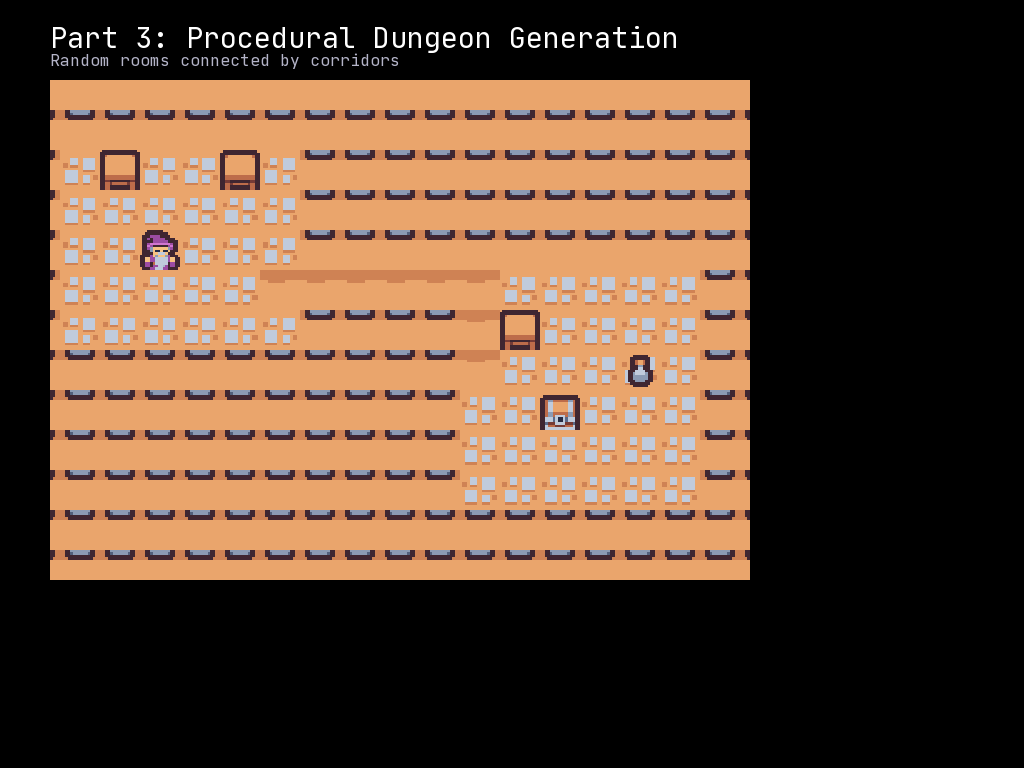
In Part 2, we created a simple map by hand with walls and floors. Now we will generate dungeons procedurally using rooms and corridors, creating a different layout every time you play.
What You Will Learn
- Creating a
RectangularRoomclass for room management - Generating random non-overlapping rooms
- Carving L-shaped tunnels between rooms
- The “fill then carve” approach to dungeon generation
- Placing the player in the starting room
The Room and Tunnel Algorithm
Our dungeon generator follows a classic approach:
- Fill the entire map with walls
- Create random rooms that do not overlap
- Connect each room to the previous one with tunnels
- Place the player in the center of the first room
This produces connected dungeons with distinct rooms and winding corridors.
The Complete Code
Create a file called part_03_dungeon_generation.py:
"""McRogueFace Tutorial - Part 3: Procedural Dungeon Generation

Generate random dungeons with rooms and corridors.
"""
import mcrfpy
import random

# =============================================================================
# Constants
# =============================================================================

# Sprite indices for CP437 tileset
SPRITE_WALL = 35    # '#' - wall
SPRITE_FLOOR = 46   # '.' - floor
SPRITE_PLAYER = 64  # '@' - player

# Grid dimensions
GRID_WIDTH = 50
GRID_HEIGHT = 35

# Room generation parameters
ROOM_MIN_SIZE = 6
ROOM_MAX_SIZE = 12
MAX_ROOMS = 8

# =============================================================================
# Room Class
# =============================================================================

class RectangularRoom:
    """A rectangular room with its position and size."""

    def __init__(self, x: int, y: int, width: int, height: int):
        """Create a new room.

        Args:
            x: Left edge X coordinate
            y: Top edge Y coordinate
            width: Room width in tiles
            height: Room height in tiles
        """
        self.x1 = x
        self.y1 = y
        self.x2 = x + width
        self.y2 = y + height

    @property
    def center(self) -> tuple[int, int]:
        """Return the center coordinates of the room."""
        center_x = (self.x1 + self.x2) // 2
        center_y = (self.y1 + self.y2) // 2
        return center_x, center_y

    @property
    def inner(self) -> tuple[slice, slice]:
        """Return the inner area of the room (excluding walls).

        The inner area is one tile smaller on each side to leave room
        for walls between adjacent rooms.
        """
        return slice(self.x1 + 1, self.x2), slice(self.y1 + 1, self.y2)

    def intersects(self, other: "RectangularRoom") -> bool:
        """Check if this room overlaps with another room.

        Args:
            other: Another RectangularRoom to check against

        Returns:
            True if the rooms overlap, False otherwise
        """
        return (
            self.x1 <= other.x2 and
            self.x2 >= other.x1 and
            self.y1 <= other.y2 and
            self.y2 >= other.y1
        )

# =============================================================================
# Dungeon Generation
# =============================================================================

def fill_with_walls(grid: mcrfpy.Grid) -> None:
    """Fill the entire grid with wall tiles."""
    for y in range(GRID_HEIGHT):
        for x in range(GRID_WIDTH):
            cell = grid.at(x, y)
            cell.tilesprite = SPRITE_WALL
            cell.walkable = False
            cell.transparent = False

def carve_room(grid: mcrfpy.Grid, room: RectangularRoom) -> None:
    """Carve out a room by setting its inner tiles to floor.

    Args:
        grid: The game grid
        room: The room to carve
    """
    inner_x, inner_y = room.inner
    for y in range(inner_y.start, inner_y.stop):
        for x in range(inner_x.start, inner_x.stop):
            if 0 <= x < GRID_WIDTH and 0 <= y < GRID_HEIGHT:
                cell = grid.at(x, y)
                cell.tilesprite = SPRITE_FLOOR
                cell.walkable = True
                cell.transparent = True

def carve_tunnel_horizontal(grid: mcrfpy.Grid, x1: int, x2: int, y: int) -> None:
    """Carve a horizontal tunnel.

    Args:
        grid: The game grid
        x1: Starting X coordinate
        x2: Ending X coordinate
        y: Y coordinate of the tunnel
    """
    start_x = min(x1, x2)
    end_x = max(x1, x2)
    for x in range(start_x, end_x + 1):
        if 0 <= x < GRID_WIDTH and 0 <= y < GRID_HEIGHT:
            cell = grid.at(x, y)
            cell.tilesprite = SPRITE_FLOOR
            cell.walkable = True
            cell.transparent = True

def carve_tunnel_vertical(grid: mcrfpy.Grid, y1: int, y2: int, x: int) -> None:
    """Carve a vertical tunnel.

    Args:
        grid: The game grid
        y1: Starting Y coordinate
        y2: Ending Y coordinate
        x: X coordinate of the tunnel
    """
    start_y = min(y1, y2)
    end_y = max(y1, y2)
    for y in range(start_y, end_y + 1):
        if 0 <= x < GRID_WIDTH and 0 <= y < GRID_HEIGHT:
            cell = grid.at(x, y)
            cell.tilesprite = SPRITE_FLOOR
            cell.walkable = True
            cell.transparent = True

def carve_l_tunnel(
    grid: mcrfpy.Grid,
    start: tuple[int, int],
    end: tuple[int, int]
) -> None:
    """Carve an L-shaped tunnel between two points.

    Randomly chooses to go horizontal-then-vertical or vertical-then-horizontal.

    Args:
        grid: The game grid
        start: Starting (x, y) coordinates
        end: Ending (x, y) coordinates
    """
    x1, y1 = start
    x2, y2 = end

    # Randomly choose whether to go horizontal or vertical first
    if random.random() < 0.5:
        # Horizontal first, then vertical
        carve_tunnel_horizontal(grid, x1, x2, y1)
        carve_tunnel_vertical(grid, y1, y2, x2)
    else:
        # Vertical first, then horizontal
        carve_tunnel_vertical(grid, y1, y2, x1)
        carve_tunnel_horizontal(grid, x1, x2, y2)

def generate_dungeon(grid: mcrfpy.Grid) -> tuple[int, int]:
    """Generate a dungeon with rooms and tunnels.

    Args:
        grid: The game grid to generate the dungeon in

    Returns:
        The (x, y) coordinates where the player should start
    """
    # Start with all walls
    fill_with_walls(grid)

    rooms: list[RectangularRoom] = []

    for _ in range(MAX_ROOMS):
        # Random room dimensions
        room_width = random.randint(ROOM_MIN_SIZE, ROOM_MAX_SIZE)
        room_height = random.randint(ROOM_MIN_SIZE, ROOM_MAX_SIZE)

        # Random position (leaving 1-tile border)
        x = random.randint(1, GRID_WIDTH - room_width - 2)
        y = random.randint(1, GRID_HEIGHT - room_height - 2)

        new_room = RectangularRoom(x, y, room_width, room_height)

        # Check for overlap with existing rooms
        overlaps = False
        for other_room in rooms:
            if new_room.intersects(other_room):
                overlaps = True
                break

        if overlaps:
            continue  # Skip this room, try another

        # No overlap - carve out the room
        carve_room(grid, new_room)

        # Connect to previous room with a tunnel
        if rooms:
            # Tunnel from this room's center to the previous room's center
            carve_l_tunnel(grid, new_room.center, rooms[-1].center)

        rooms.append(new_room)

    # Return the center of the first room as the player start position
    if rooms:
        return rooms[0].center
    else:
        # Fallback if no rooms were generated
        return GRID_WIDTH // 2, GRID_HEIGHT // 2

# =============================================================================
# Collision Detection
# =============================================================================

def can_move_to(grid: mcrfpy.Grid, x: int, y: int) -> bool:
    """Check if a position is valid for movement."""
    if x < 0 or x >= GRID_WIDTH or y < 0 or y >= GRID_HEIGHT:
        return False
    return grid.at(x, y).walkable

# =============================================================================
# Game Setup
# =============================================================================

# Create the scene
scene = mcrfpy.Scene("game")

# Load texture
texture = mcrfpy.Texture("assets/kenney_tinydungeon.png", 16, 16)

# Create the grid
grid = mcrfpy.Grid(
    pos=(50, 80),
    size=(800, 560),
    grid_size=(GRID_WIDTH, GRID_HEIGHT),
    texture=texture,
    zoom=1.0
)

# Generate the dungeon and get player start position
player_start_x, player_start_y = generate_dungeon(grid)

# Create the player at the starting position
player = mcrfpy.Entity(
    grid_pos=(player_start_x, player_start_y),
    texture=texture,
    sprite_index=SPRITE_PLAYER
)
grid.entities.append(player)

# Add grid to scene
scene.children.append(grid)

# =============================================================================
# UI Elements
# =============================================================================

title = mcrfpy.Caption(
    pos=(50, 15),
    text="Part 3: Procedural Dungeon Generation"
)
title.fill_color = mcrfpy.Color(255, 255, 255)
title.font_size = 24
scene.children.append(title)

instructions = mcrfpy.Caption(
    pos=(50, 50),
    text="WASD/Arrows: Move | R: Regenerate dungeon | Escape: Quit"
)
instructions.fill_color = mcrfpy.Color(180, 180, 180)
instructions.font_size = 16
scene.children.append(instructions)

pos_display = mcrfpy.Caption(
    pos=(50, 660),
    text=f"Position: ({player.grid_x}, {player.grid_y})"
)
pos_display.fill_color = mcrfpy.Color(200, 200, 100)
pos_display.font_size = 16
scene.children.append(pos_display)

room_display = mcrfpy.Caption(
    pos=(400, 660),
    text="Press R to regenerate the dungeon"
)
room_display.fill_color = mcrfpy.Color(100, 200, 100)
room_display.font_size = 16
scene.children.append(room_display)

# =============================================================================
# Input Handling
# =============================================================================

def regenerate_dungeon() -> None:
    """Generate a new dungeon and reposition the player."""
    new_x, new_y = generate_dungeon(grid)
    player.grid_x = new_x
    player.grid_y = new_y
    pos_display.text = f"Position: ({new_x}, {new_y})"
    room_display.text = "New dungeon generated!"

def handle_keys(key: mcrfpy.Key, action: mcrfpy.InputState) -> None:
    """Handle keyboard input."""
    if action != mcrfpy.InputState.PRESSED:
        return

    px, py = player.grid_x, player.grid_y
    new_x, new_y = px, py

    if key == mcrfpy.Key.W or key == mcrfpy.Key.UP:
        new_y -= 1
    elif key == mcrfpy.Key.S or key == mcrfpy.Key.DOWN:
        new_y += 1
    elif key == mcrfpy.Key.A or key == mcrfpy.Key.LEFT:
        new_x -= 1
    elif key == mcrfpy.Key.D or key == mcrfpy.Key.RIGHT:
        new_x += 1
    elif key == mcrfpy.Key.R:
        regenerate_dungeon()
        return
    elif key == mcrfpy.Key.ESCAPE:
        mcrfpy.exit()
        return
    else:
        return

    if can_move_to(grid, new_x, new_y):
        player.grid_x = new_x
        player.grid_y = new_y
        pos_display.text = f"Position: ({new_x}, {new_y})"

scene.on_key = handle_keys

# =============================================================================
# Start the Game
# =============================================================================

scene.activate()
print("Part 3 loaded! Explore the dungeon or press R to regenerate.")
Understanding the Code
The RectangularRoom Class
class RectangularRoom:
    def __init__(self, x: int, y: int, width: int, height: int):
        self.x1 = x
        self.y1 = y
        self.x2 = x + width
        self.y2 = y + height
We store rooms as two corner coordinates (top-left and bottom-right) rather than position and size. This makes intersection checking simpler.
Finding the Room Center
@property
def center(self) -> tuple[int, int]:
    center_x = (self.x1 + self.x2) // 2
    center_y = (self.y1 + self.y2) // 2
    return center_x, center_y
The center is used for two purposes:
- Connecting tunnels between rooms
- Placing the player in the first room
The Inner Area
@property
def inner(self) -> tuple[slice, slice]:
    return slice(self.x1 + 1, self.x2), slice(self.y1 + 1, self.y2)
When carving a room, we carve the “inner” area - one tile smaller on each side. This ensures there is always at least one wall tile between adjacent rooms.
Checking Intersection
def intersects(self, other: "RectangularRoom") -> bool:
    return (
        self.x1 <= other.x2 and
        self.x2 >= other.x1 and
        self.y1 <= other.y2 and
        self.y2 >= other.y1
    )
Two rectangles overlap if and only if they overlap on both the X and Y axes. This is the standard AABB (Axis-Aligned Bounding Box) collision test.
The Fill-Then-Carve Pattern
def generate_dungeon(grid: mcrfpy.Grid) -> tuple[int, int]:
    # Start with all walls
    fill_with_walls(grid)
We begin by filling the entire grid with walls. Then we “carve out” rooms and tunnels by changing wall tiles to floor tiles. This is simpler than trying to place walls around rooms.
L-Shaped Tunnels
def carve_l_tunnel(grid, start, end):
    x1, y1 = start
    x2, y2 = end

    if random.random() < 0.5:
        carve_tunnel_horizontal(grid, x1, x2, y1)
        carve_tunnel_vertical(grid, y1, y2, x2)
    else:
        carve_tunnel_vertical(grid, y1, y2, x1)
        carve_tunnel_horizontal(grid, x1, x2, y2)
L-shaped tunnels connect two points using exactly two straight segments - one horizontal and one vertical. We randomly choose which direction to go first, adding variety to the dungeon layout.
Room A center: (5, 5)    Room B center: (15, 10)

Option 1: Horizontal first      Option 2: Vertical first
    A----+                          A
         |                          |
         +----B                     +----B
Room Generation Loop
for _ in range(MAX_ROOMS):
    # Generate random room
    new_room = RectangularRoom(...)

    # Check overlaps
    overlaps = False
    for other_room in rooms:
        if new_room.intersects(other_room):
            overlaps = True
            break

    if overlaps:
        continue  # Skip and try again

    # Carve and connect
    carve_room(grid, new_room)
    if rooms:
        carve_l_tunnel(grid, new_room.center, rooms[-1].center)
    rooms.append(new_room)
We attempt to place MAX_ROOMS rooms. Some attempts will fail due to overlap, so the final dungeon usually has fewer rooms than MAX_ROOMS. Each new room is connected to the previous one, guaranteeing a fully connected dungeon.
Dungeon Generation Parameters
The constants at the top control the dungeon’s character:
ROOM_MIN_SIZE = 6      # Minimum room dimension
ROOM_MAX_SIZE = 12     # Maximum room dimension
MAX_ROOMS = 8          # Maximum rooms to attempt
| Parameter | Smaller Values | Larger Values |
|---|---|---|
ROOM_MIN_SIZE |
More cramped rooms | Bigger open spaces |
ROOM_MAX_SIZE |
Consistent small rooms | High room size variety |
MAX_ROOMS |
Sparse dungeon | Dense, maze-like dungeon |
Visualization of the Algorithm
Here is a step-by-step example:
Step 1: Fill with walls
####################################
####################################
####################################
####################################

Step 2: Carve first room at (5, 5)
####################################
#####.....##########################
#####.....##########################
#####.....##########################
####################################

Step 3: Carve second room at (20, 10), connect to first
####################################
#####.....##########################
#####.....##########################
#####.....###########..............#
#####.....#......................##
##########.##########..............#
####################################

(And so on for each room...)
Try This
- Adjust room sizes: Try
ROOM_MIN_SIZE = 4andROOM_MAX_SIZE = 8for a more cramped dungeon - More rooms: Set
MAX_ROOMS = 15and see how dense the dungeon becomes - Different grid sizes: Try
GRID_WIDTH = 80, GRID_HEIGHT = 45for a larger dungeon - Seed the random: Add
random.seed(42)before generation for reproducible dungeons - Room spacing: Add a buffer to
intersects()to ensure rooms are always separated by at least 2 tiles
Challenge: Direct Tunnels
Modify carve_l_tunnel to sometimes carve a direct diagonal path using Bresenham’s line algorithm. (McRogueFace also ships a built-in mcrfpy.bresenham() module function you can use instead of writing your own.)
def bresenham_line(x1: int, y1: int, x2: int, y2: int) -> list[tuple[int, int]]:
    """Generate points along a line from (x1, y1) to (x2, y2)."""
    points = []
    dx = abs(x2 - x1)
    dy = abs(y2 - y1)
    x, y = x1, y1
    sx = 1 if x1 < x2 else -1
    sy = 1 if y1 < y2 else -1

    if dx > dy:
        err = dx / 2
        while x != x2:
            points.append((x, y))
            err -= dy
            if err < 0:
                y += sy
                err += dx
            x += sx
    else:
        err = dy / 2
        while y != y2:
            points.append((x, y))
            err -= dx
            if err < 0:
                x += sx
                err += dy
            y += sy

    points.append((x2, y2))
    return points
Challenge: Room Types
Create different room shapes by adding new carving functions:
def carve_circular_room(grid: mcrfpy.Grid, center_x: int, center_y: int, radius: int) -> None:
    """Carve a circular room."""
    for y in range(center_y - radius, center_y + radius + 1):
        for x in range(center_x - radius, center_x + radius + 1):
            # Check if point is within circle
            if (x - center_x) ** 2 + (y - center_y) ** 2 <= radius ** 2:
                if 0 <= x < GRID_WIDTH and 0 <= y < GRID_HEIGHT:
                    cell = grid.at(x, y)
                    cell.tilesprite = SPRITE_FLOOR
                    cell.walkable = True
                    cell.transparent = True
Common Mistakes
- Off-by-one errors: Forgetting that
range(a, b)excludesb - Out-of-bounds access: Always check coordinates before
grid.at(x, y) - Not connecting rooms: Every room after the first must tunnel to the previous
- Too many overlap failures: If
MAX_ROOMSis too high relative to grid size, most rooms will overlap and be rejected
What is Next
In Part 4, we will add field of view (FOV) so the player can only see nearby tiles. This creates the classic “fog of war” effect where unexplored areas are hidden and explored areas are dimmed.
You will learn:
- Using
grid.compute_fov()to calculate visible tiles - Adding a
ColorLayerto visualize visibility - Tracking explored vs. visible vs. unknown tiles
- Updating FOV when the player moves
Continue to Part 4: Field of View
Complete Code Reference
The complete code is shown above in the main section. Key components:
- RectangularRoom class: Manages room geometry and intersection testing
- Carving functions:
fill_with_walls,carve_room,carve_tunnel_* - generate_dungeon(): Orchestrates the full dungeon generation
- regenerate_dungeon(): Allows pressing R to create a new layout