Part 2: Walls, Floors, and Collision
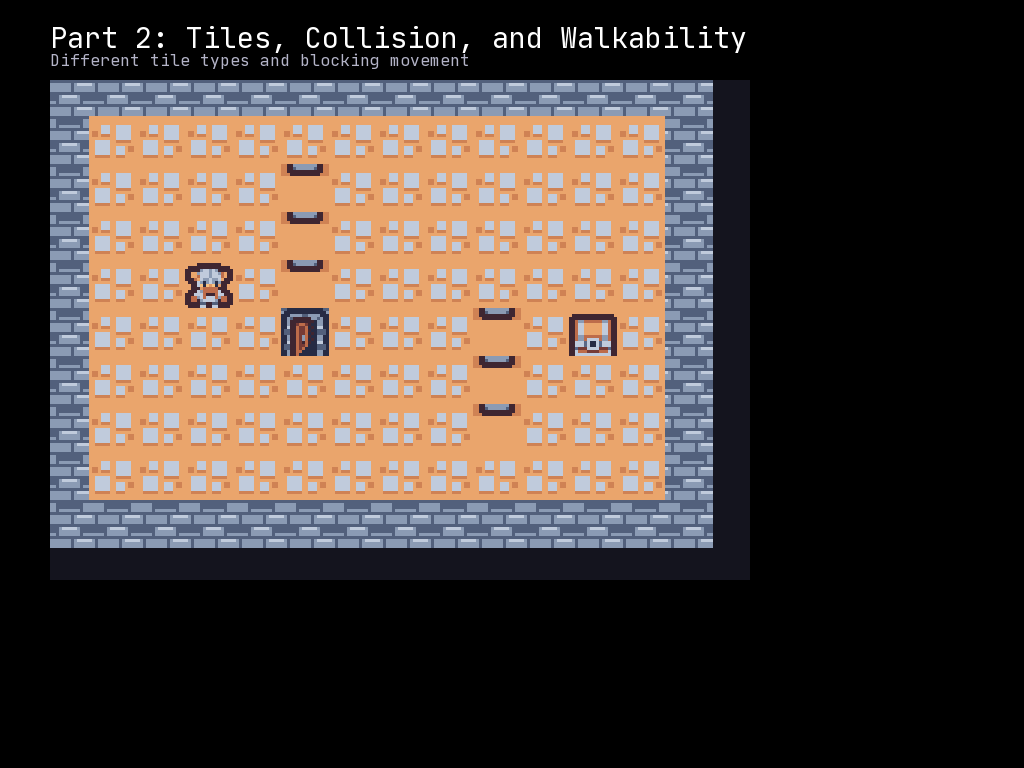
In Part 1, we created a grid and moved a player around freely. Now we will add walls that block movement, creating a proper dungeon feel with collision detection.
What You Will Learn
- Defining tile types (walls, floors)
- Setting tile properties (
walkable,tilesprite) - Implementing collision detection before movement
- Creating a simple map with boundaries
Tile Properties
Each cell in a Grid has properties that control both appearance and behavior:
| Property | Type | Purpose |
|---|---|---|
tilesprite |
int | Which sprite index to display |
walkable |
bool | Can entities move through this cell? |
transparent |
bool | Does this cell block line of sight? |
For a roguelike, we care most about walkable - walls should block movement.
Note:
cell.tilesprite = N(used throughout this tutorial) is the simple, legacy way to set a tile’s appearance and still works today. The modern equivalent is aTileLayer:tile_layer.set((x, y), N). Either form is fine for this tutorial; theTileLayerform becomes useful once you want multiple stacked tile layers (Part 3+).
The Complete Code
Create a file called part_02_tiles_collision.py:
"""McRogueFace Tutorial - Part 2: Walls, Floors, and Collision

Learn to create maps with impassable walls and collision detection.
"""
import mcrfpy

# =============================================================================
# Constants
# =============================================================================

# Sprite indices for CP437 tileset
SPRITE_WALL = 35    # '#' - wall
SPRITE_FLOOR = 46   # '.' - floor
SPRITE_PLAYER = 64  # '@' - player

# Grid dimensions
GRID_WIDTH = 30
GRID_HEIGHT = 20

# =============================================================================
# Map Creation
# =============================================================================

def create_map(grid: mcrfpy.Grid) -> None:
    """Fill the grid with walls and floors.

    Creates a simple room with walls around the edges and floor in the middle.
    """
    for y in range(GRID_HEIGHT):
        for x in range(GRID_WIDTH):
            cell = grid.at(x, y)

            # Place walls around the edges
            if x == 0 or x == GRID_WIDTH - 1 or y == 0 or y == GRID_HEIGHT - 1:
                cell.tilesprite = SPRITE_WALL
                cell.walkable = False
            else:
                cell.tilesprite = SPRITE_FLOOR
                cell.walkable = True

    # Add some interior walls to make it interesting
    # Vertical wall
    for y in range(5, 15):
        cell = grid.at(10, y)
        cell.tilesprite = SPRITE_WALL
        cell.walkable = False

    # Horizontal wall
    for x in range(15, 25):
        cell = grid.at(x, 10)
        cell.tilesprite = SPRITE_WALL
        cell.walkable = False

    # Leave gaps for doorways
    grid.at(10, 10).tilesprite = SPRITE_FLOOR
    grid.at(10, 10).walkable = True
    grid.at(20, 10).tilesprite = SPRITE_FLOOR
    grid.at(20, 10).walkable = True

# =============================================================================
# Collision Detection
# =============================================================================

def can_move_to(grid: mcrfpy.Grid, x: int, y: int) -> bool:
    """Check if a position is valid for movement.

    Args:
        grid: The game grid
        x: Target X coordinate (in tiles)
        y: Target Y coordinate (in tiles)

    Returns:
        True if the position is walkable, False otherwise
    """
    # Check grid bounds first
    if x < 0 or x >= GRID_WIDTH:
        return False
    if y < 0 or y >= GRID_HEIGHT:
        return False

    # Check if the tile is walkable
    cell = grid.at(x, y)
    return cell.walkable

# =============================================================================
# Game Setup
# =============================================================================

# Create the scene
scene = mcrfpy.Scene("game")

# Load texture
texture = mcrfpy.Texture("assets/kenney_tinydungeon.png", 16, 16)

# Create the grid
grid = mcrfpy.Grid(
    pos=(80, 100),
    size=(720, 480),
    grid_size=(GRID_WIDTH, GRID_HEIGHT),
    texture=texture,
    zoom=1.5
)

# Build the map
create_map(grid)

# Create the player in the center of the left room
player = mcrfpy.Entity(
    grid_pos=(5, 10),
    texture=texture,
    sprite_index=SPRITE_PLAYER
)
grid.entities.append(player)

# Add grid to scene
scene.children.append(grid)

# =============================================================================
# UI Elements
# =============================================================================

title = mcrfpy.Caption(
    pos=(80, 20),
    text="Part 2: Walls and Collision"
)
title.fill_color = mcrfpy.Color(255, 255, 255)
title.font_size = 24
scene.children.append(title)

instructions = mcrfpy.Caption(
    pos=(80, 55),
    text="WASD or Arrow Keys to move | Walls block movement"
)
instructions.fill_color = mcrfpy.Color(180, 180, 180)
instructions.font_size = 16
scene.children.append(instructions)

pos_display = mcrfpy.Caption(
    pos=(80, 600),
    text=f"Position: ({player.grid_x}, {player.grid_y})"
)
pos_display.fill_color = mcrfpy.Color(200, 200, 100)
pos_display.font_size = 16
scene.children.append(pos_display)

status_display = mcrfpy.Caption(
    pos=(400, 600),
    text="Status: Ready"
)
status_display.fill_color = mcrfpy.Color(100, 200, 100)
status_display.font_size = 16
scene.children.append(status_display)

# =============================================================================
# Input Handling
# =============================================================================

def handle_keys(key: mcrfpy.Key, action: mcrfpy.InputState) -> None:
    """Handle keyboard input with collision detection."""
    if action != mcrfpy.InputState.PRESSED:
        return

    # Get current position
    px, py = player.grid_x, player.grid_y

    # Calculate intended new position
    new_x, new_y = px, py

    if key == mcrfpy.Key.W or key == mcrfpy.Key.UP:
        new_y -= 1
    elif key == mcrfpy.Key.S or key == mcrfpy.Key.DOWN:
        new_y += 1
    elif key == mcrfpy.Key.A or key == mcrfpy.Key.LEFT:
        new_x -= 1
    elif key == mcrfpy.Key.D or key == mcrfpy.Key.RIGHT:
        new_x += 1
    elif key == mcrfpy.Key.ESCAPE:
        mcrfpy.exit()
        return
    else:
        return  # Ignore other keys

    # Check collision before moving
    if can_move_to(grid, new_x, new_y):
        player.grid_x = new_x
        player.grid_y = new_y
        pos_display.text = f"Position: ({new_x}, {new_y})"
        status_display.text = "Status: Moved"
        status_display.fill_color = mcrfpy.Color(100, 200, 100)
    else:
        status_display.text = "Status: Blocked!"
        status_display.fill_color = mcrfpy.Color(200, 100, 100)

scene.on_key = handle_keys

# =============================================================================
# Start the Game
# =============================================================================

scene.activate()
print("Part 2 loaded! Try walking into walls.")
Understanding Collision Detection
The Two-Step Movement Pattern
Safe movement in a tile-based game follows this pattern:
- Calculate the intended destination
- Check if the destination is valid
- Move only if the check passes
# Step 1: Calculate
new_x, new_y = px, py
if key == mcrfpy.Key.W:
    new_y -= 1

# Step 2: Check
if can_move_to(grid, new_x, new_y):
    # Step 3: Move
    player.grid_x = new_x
    player.grid_y = new_y
Never move first and check later - that leads to entities getting stuck in walls.
Bounds Checking
if x < 0 or x >= GRID_WIDTH:
    return False
if y < 0 or y >= GRID_HEIGHT:
    return False
Always check grid bounds before accessing grid.at(x, y). Accessing out-of-bounds coordinates may cause errors or undefined behavior.
The walkable Property
cell = grid.at(x, y)
return cell.walkable
The walkable property is a boolean that you control. Set it when creating your map:
# Walls block movement
cell.walkable = False

# Floors allow movement
cell.walkable = True
This separates visual appearance (tilesprite) from game logic (walkable). A tile can look like a floor but act like a wall, or vice versa - useful for traps, illusions, or secret passages.
Map Design Patterns
The Border Pattern
if x == 0 or x == GRID_WIDTH - 1 or y == 0 or y == GRID_HEIGHT - 1:
    cell.walkable = False  # Wall
else:
    cell.walkable = True   # Floor
This creates walls around the entire edge of the map, preventing the player from walking off the grid.
Adding Interior Walls
# Vertical wall
for y in range(5, 15):
    cell = grid.at(10, y)
    cell.tilesprite = SPRITE_WALL
    cell.walkable = False
Add walls anywhere by iterating over coordinates. Leave gaps for doorways:
grid.at(10, 10).walkable = True # Doorway
Visual Consistency
Always keep tilesprite and walkable in sync:
# GOOD: Visual matches behavior
cell.tilesprite = SPRITE_WALL
cell.walkable = False

# BAD: Invisible wall - confusing to player!
cell.tilesprite = SPRITE_FLOOR
cell.walkable = False
Exception: Intentional hidden mechanics like secret doors or trap tiles.
The Current Map Structure
The code creates a map like this:
##############################
#........#..................#
#........#..................#
#........#..................#
#........#..................#
#........#..................#
#........#......#############
#........#......#...........#
#........#......#...........#
#........#......#...........#
#........+......+...........#
#........#......#...........#
#........#......#...........#
#........#......#...........#
#........#..................#
#........#..................#
#........#..................#
#........#..................#
#........#..................#
##############################

Legend: # = wall, . = floor, + = doorway
The player starts in the left room and must navigate through doorways to explore.
Building on the Pattern
This collision system will grow in later parts:
| Part | What Gets Checked |
|---|---|
| 2 (now) | Tile walkability |
| 5 | Other entities (blocking) |
| 6 | Combat triggers |
| 8 | Item pickup |
The can_move_to() function will expand to handle these cases.
Try This
- Create a maze: Design a more complex map with multiple paths
- Add diagonal movement: Check keys like “Q” (up-left), “E” (up-right)
- Toggle walls: Press a key to make walls temporarily walkable
- Color-code feedback: Change the player sprite color when blocked
- Add a counter: Track and display how many times the player tried to walk into walls
Challenge: Procedural Room
Create a function that generates a random room:
import random

def create_random_room(grid, x, y, width, height):
    """Create a room with walls and floor at the given position."""
    # Your code here:
    # - Fill the area with floor tiles
    # - Add walls around the perimeter
    # - Return the center position for player placement
    pass
Common Mistakes
- Forgetting bounds check: Always verify coordinates are valid before
grid.at() - Checking after moving: Always check BEFORE updating position
- Mismatched visuals: A wall tile should always have
walkable = False - Hardcoded sizes: Use constants like
GRID_WIDTHinstead of magic numbers
What is Next
In Part 3, we will generate dungeons procedurally using rooms and corridors. You will learn:
- The rectangular room data structure
- Carving rooms into solid rock
- Connecting rooms with tunnels
- Placing the player in the first room
Continue to Part 3: Procedural Dungeon Generation
Complete Code Reference
Here is the full code again for easy copying:
"""McRogueFace Tutorial - Part 2: Walls, Floors, and Collision"""
import mcrfpy

# Constants
SPRITE_WALL = 35
SPRITE_FLOOR = 46
SPRITE_PLAYER = 64
GRID_WIDTH = 30
GRID_HEIGHT = 20

def create_map(grid: mcrfpy.Grid) -> None:
    for y in range(GRID_HEIGHT):
        for x in range(GRID_WIDTH):
            cell = grid.at(x, y)
            if x == 0 or x == GRID_WIDTH - 1 or y == 0 or y == GRID_HEIGHT - 1:
                cell.tilesprite = SPRITE_WALL
                cell.walkable = False
            else:
                cell.tilesprite = SPRITE_FLOOR
                cell.walkable = True

    for y in range(5, 15):
        cell = grid.at(10, y)
        cell.tilesprite = SPRITE_WALL
        cell.walkable = False

    for x in range(15, 25):
        cell = grid.at(x, 10)
        cell.tilesprite = SPRITE_WALL
        cell.walkable = False

    grid.at(10, 10).tilesprite = SPRITE_FLOOR
    grid.at(10, 10).walkable = True
    grid.at(20, 10).tilesprite = SPRITE_FLOOR
    grid.at(20, 10).walkable = True

def can_move_to(grid: mcrfpy.Grid, x: int, y: int) -> bool:
    if x < 0 or x >= GRID_WIDTH or y < 0 or y >= GRID_HEIGHT:
        return False
    return grid.at(x, y).walkable

scene = mcrfpy.Scene("game")
texture = mcrfpy.Texture("assets/kenney_tinydungeon.png", 16, 16)

grid = mcrfpy.Grid(
    pos=(80, 100), size=(720, 480),
    grid_size=(GRID_WIDTH, GRID_HEIGHT), texture=texture,
    zoom=1.5
)
create_map(grid)

player = mcrfpy.Entity(grid_pos=(5, 10), texture=texture, sprite_index=SPRITE_PLAYER)
grid.entities.append(player)
scene.children.append(grid)

title = mcrfpy.Caption(pos=(80, 20), text="Part 2: Walls and Collision")
title.fill_color = mcrfpy.Color(255, 255, 255)
title.font_size = 24
scene.children.append(title)

instructions = mcrfpy.Caption(pos=(80, 55), text="WASD or Arrow Keys | Walls block movement")
instructions.fill_color = mcrfpy.Color(180, 180, 180)
instructions.font_size = 16
scene.children.append(instructions)

pos_display = mcrfpy.Caption(pos=(80, 600), text=f"Position: ({player.grid_x}, {player.grid_y})")
pos_display.fill_color = mcrfpy.Color(200, 200, 100)
pos_display.font_size = 16
scene.children.append(pos_display)

status_display = mcrfpy.Caption(pos=(400, 600), text="Status: Ready")
status_display.fill_color = mcrfpy.Color(100, 200, 100)
status_display.font_size = 16
scene.children.append(status_display)

def handle_keys(key: mcrfpy.Key, action: mcrfpy.InputState) -> None:
    if action != mcrfpy.InputState.PRESSED:
        return
    px, py = player.grid_x, player.grid_y
    new_x, new_y = px, py
    if key == mcrfpy.Key.W or key == mcrfpy.Key.UP:
        new_y -= 1
    elif key == mcrfpy.Key.S or key == mcrfpy.Key.DOWN:
        new_y += 1
    elif key == mcrfpy.Key.A or key == mcrfpy.Key.LEFT:
        new_x -= 1
    elif key == mcrfpy.Key.D or key == mcrfpy.Key.RIGHT:
        new_x += 1
    elif key == mcrfpy.Key.ESCAPE:
        mcrfpy.exit()
        return
    else:
        return
    if can_move_to(grid, new_x, new_y):
        player.grid_x = new_x
        player.grid_y = new_y
        pos_display.text = f"Position: ({new_x}, {new_y})"
        status_display.text = "Status: Moved"
        status_display.fill_color = mcrfpy.Color(100, 200, 100)
    else:
        status_display.text = "Status: Blocked!"
        status_display.fill_color = mcrfpy.Color(200, 100, 100)

scene.on_key = handle_keys
scene.activate()